Senomix Time Tracking Buy Senomix Timesheets
Time Tracking           BlackBerry           Details           FAQ           Documentation           Pricing           News & Updates           Contact

Easy Time Tracking


Senomix Timesheets office time tracking software

Ready For Your Office

Screen Shots


BlackBerry Time Tracking


How To Buy Senomix


QuickBooks Time Tracking


Frequently Asked Questions

Clear and Direct


Timesheet Entry screenSenomix Timesheets has been designed with busy employees in mind, using system screens constructed in a simple, straight-forward style to let your people record their time with a minimum of fuss.

Structured like a traditional paper timesheet, Senomix's user interface lets an employee register their time and billing codes in as detailed or general a manner as required, with entry screens automatically fitted to your office's week ending day.

Providing your staff with an easy, one-button click to submit their time or store a timesheet layout for future use, Senomix Timesheets' simple structure enables a user to log on and register their hours in just a few moments.

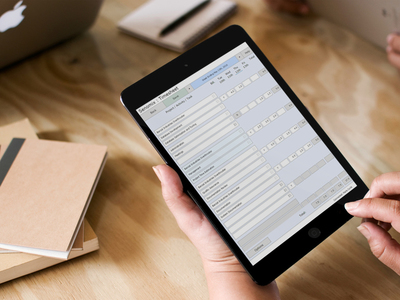
Senomix Timesheets for Mac OS XReady to use with Windows, Mac OS X, BlackBerry and Linux, Senomix Timesheets provides all-Windows, all-Mac or mixed computer offices with a simple way to coordinate their work whether in the office or on the road.

Senomix Timesheets for BlackBerrySenomix Timesheets for BlackBerry communicates directly with the Timesheets Server running on your office computer, so no cables or other desktop synchronization steps are required. As time is entered in your BlackBerry, it is immediately saved on your office's server computer.

Stopwatch Time TrackingMaking detailed time tracking an effortless task, the Senomix Stopwatch may also be run quietly in a computer's background, leaving the system to automatically record time through your office's network as employees go about their day. Minimized to a computer's system tray, the Stopwatch may be quickly switched to record work as it happens, ensuring that the time recorded accurately tracks how that time was spent.

Timesheet Entry screen with commentEnhancing the value of your timesheet records, Senomix allows any system user to attach up to 1,000 characters of descriptive comment text to each and every timesheet entry they file, providing your employees with as much space as they need to record project status and ensuring your managers remain up-to-date on their team's activities.

Abbreviated codes and keyboard mnemonics provide experienced employees with a non-nonsense tool for rapidly registering their billing hours, while giving your infrequent computer users the clearly-labeled buttons and drop-down lists they prefer. Client and project billing time will be saved with the streamlining of your timesheet submission process, and the daily entry of effort hours becomes a practical option for all staff.


Clean interface makes
time entry a snap


Use with Windows,
Mac OS X, BlackBerry
and Linux!


Track Time on BlackBerry with
no desktop synchronization needed!


Automatically track time
with the Senomix Stopwatch


Attach 1,000 characters
of comment to any
timesheet entry


Fast on the keyboard?

Complete a timesheet
mouse-free!

Easily Installed


Senomix Timesheets Main ScreenSenomix Timesheets works on your own office network and uses the computers you have in place today. With desktop applications run right from Windows, Macintosh OS X, BlackBerry or Linux, your staff can quickly enter their time using fast and responsive system screens from whatever computer they choose.

QuickBooks Data ImportYou can start from scratch to enter your employee, project and task details in Senomix's administration system, or directly import that information from your office's QuickBooks data set.

Whether installed as a standard executable program, launched from your office's application server or deployed through the Internet using Java Web Start, Senomix Timesheets delivers the speed of a desktop application and the maintenance simplicity of the Internet without need of a dedicated web server or browser-based forms.


Installed on your own network
using your own office computers


Ready to use with QuickBooks!

Easily Adjusted


Task Administration screenBilling codes may be added or removed by an administrator at any time to refine the detail at which effort is logged, with estimates for effort hours or completion dates recorded at the precision which suits your project.

Able to adjust task information as a project matures, managers may temporarily remove billing codes which do not currently apply to a project, or add details to project work which has grown in complexity over time.

With its simple, adjustable interface, Senomix Timesheets provides the leader of any project team with the flexibility they need to accurately record the effort hours of their staff.


Easily adjust timesheets
to match your projects

Speedy System Launch


Fast LoginWith project templates and optimized networked communication, Senomix Timesheets can be used to manage dozens or thousands of projects as suits your requirements.

Automatically regulating network traffic, Senomix Timesheets ensures that your users will not be left waiting when it comes time to track their work. With its self-maintained data management system, Senomix provides your system administrators with a networked time tracking tool they can install and forget.


Fast system login
even with thousands of Projects!

Details When You Need Them


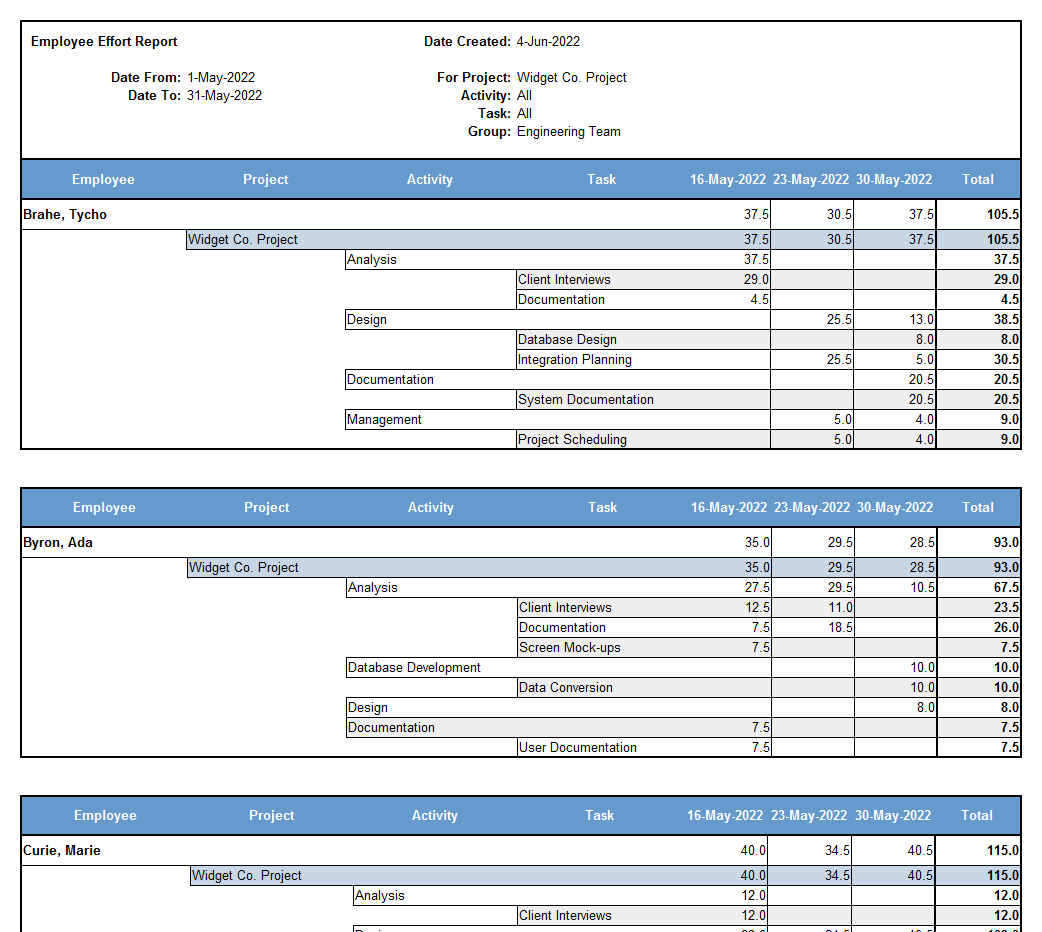
The Administration and Reports tools of Senomix Timesheets let you quickly generate detailed information summaries for review as HTML web pages or Microsoft Excel spreadsheets.

Track time and project progressA manager using Senomix Timesheets may view a daily snapshot of a project's state, identify the effort expended on any tracked work process or head off scheduling difficulties before they become an issue. By providing your managers with accurate daily effort reports, project delays may be quickly identified and resolved, with staff effort directed to where its needed at the time it is needed.

Individual employees may also be given limited access to their own data to review past estimates, project progress or recorded vacation time as they would like.

Some of the reports you can create with Senomix Timesheets are shown on the product's summary page, with full details of the reports available outlined in our system documentation.


Easily send reports
directly to Microsoft Excel

Estimates Tracked With Ease


An Estimate Entry screen for the Widget Co. ProjectUsing the Estimate Tracking feature of Senomix Timesheets, staff may easily enter the number of hours their assigned work will require to complete.

With up to 1,000 characters of additional comment text available for each and every work estimate, your managers will be kept informed of staff priorities and schedule concerns without the need for time-consuming face-to-face status meetings.

Able to quickly compare their project schedules with work estimates provided by their staff, managers may easily 'reality check' project plans to ensure that sufficient time has been noted for every aspect of project work; with time deficits and surpluses immediately apparent in estimate variance reports.


Identify project scheduling issues
without status meetings

Project Status at a Glance


A Work In Progress Report for the Widget Co. ProjectWith Work In Progress reports providing summary details of time spent on every recorded work activity, time estimates may be compared with actual effort to identify potential problem areas or project bottlenecks.

Since time is recorded as precisely as you and your team decide, specific causes of schedule over-runs may be identified and addressed before they become an obstacle to your goals.

Providing your managers with quick access to a library of recorded effort, Senomix Timesheets helps improve the accuracy of your project schedules and estimates by drawing upon the best information resource available to your team: Your company's own experience.


View a Project's effort
history at-a-glance

Flexible Invoices


A weekly billing Invoice for the Widget Co. ProjectBilling rates may be easily adjusted within Senomix Timesheets to apply project charges to each employee's effort.

With the ability to set a general project rate or specific hourly charge for each member of your staff, billing may be applied to different phases of project work, with distinct rates available right down to the detail of individual project tasks.

Billing invoices may be generated from your collected timesheet data to create print-ready spreadsheet records for your office; with charges outlined as precisely as you specify.

If you already have accounting software in place at your office, Senomix Timesheets data may also be exported for use in your system. With a direct export to Microsoft Excel, QuickBooks, MYOB Accounting and Peachtree included with the application, it's easy to use your timesheet data for client billing.


Assign Billing Rates by Project,
Employee or Work Activity

Your Data is Secure


Timesheet SecurityAll data transmitted between Senomix applications is secured using a proprietary, encrypted communications protocol which ensures your data remains safe, no matter which network it is transmitted through. Whether filing Timesheets within the office, from a client site or on the road through BlackBerry or the public Internet, your H.R. data remains secure from end-to-end.

Once saved by the Senomix Timesheets server, your data remains safely encrypted within a self-contained data management system. With no databases to configure or maintain, Senomix provides a truly integrated solution for your company's time management needs while keeping your corporate databases safely off the Internet.


Secure your H.R. data
with Senomix's Encrypted
Communications Protocol

Your Data is Free


Timesheet Database ExportThrough the Administration system of Senomix Timesheets, collected effort hour data may be exported into a text file which can be transferred to any database or data management tool.

Moments after timesheets have been submitted by your staff, an administrator may create a weekly or monthly data summary for payroll and billing calculation -- streamlining your company's processes and eliminating the headache of tracking down and sorting paper timesheets.

You can also export employee timesheets to your office's QuickBooks, MYOB Accounting or Peachtree accounting software for immediate use in invoice and payroll generation, or to provide another perspective on your recorded effort. Once retrieved by Senomix Timesheets, your data is free to be used in any capacity you require.


Transfer timesheets
to your corporate database


Load timesheets into your
QuickBooks, MYOB or
Peachtree accounting software


With all features available off-the-shelf,
Senomix Timesheets provides a simple,
ready-to-run solution for your
timesheet management.


Senomix Timesheets


I would be delighted to recommend Senomix Timesheets – we would struggle to operate without it now.

R. Uttley
Schwartz LLC
Barnsley, United Kingdom
   Time Tracking        Screen Shots        Downloads        FAQ        Documentation        Pricing        Privacy Policy        Contact Click to verify BBB accreditation and to see a BBB report. © 2003-2010 Senomix Software Inc.  
All Rights Reserved