Senomix Timesheet Software for Office Time Tracking   Have questions?
Call us at (647) 345-2481
Contact Us
Screen Shots           FAQ           QuickBooks           Documentation           Plans & Pricing           News & Updates
Wondering How Your Office Time Is Spent?
create reports with senomix timesheet software

Get Answers With Senomix Timesheets


Identify billable and non-billable client hours

See which tasks consume the most office time

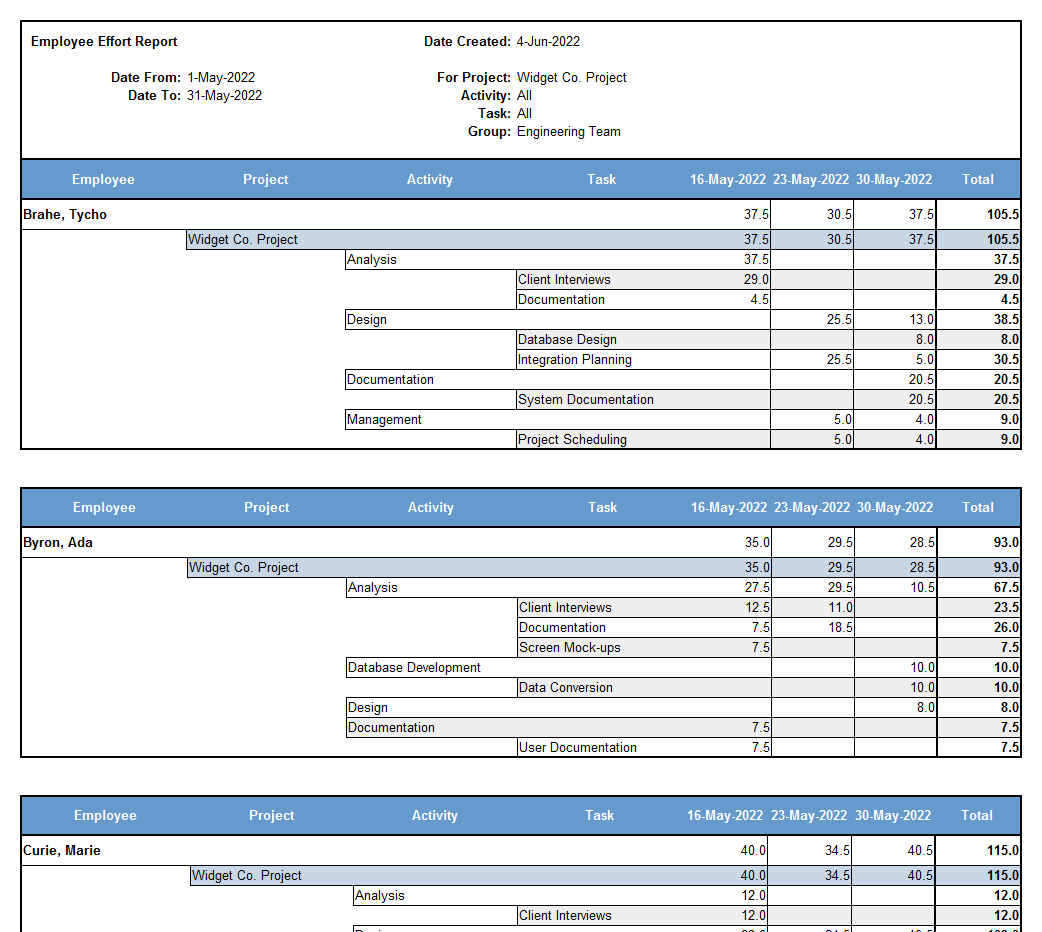
Compare employee effort across projects

Review billed hours and amounts

Track project expenses


Summarize employee work performed

Compare estimates and actuals for project work

Itemize time spent on cross-project activities

Identify potential schedule over-runs

Link to QuickBooks


Find Out What's Happening


Once staff effort and expenses have been recorded in Senomix Timesheets, you can immediately create informative reports to see how your office time and budgeted funds are being directed.

Task summary generated from timesheet recordsWhether you're looking to identify billable and non-billable hours, see how time has been spent on a specific project, summarize work performed by an employee, or see which tasks are consuming the most time for your staff, the reports provided with Senomix Timesheets will allow you to quickly fetch those answers and turn your time and expense data into actionable information.

A listing of timesheet commentsYou can examine projects as a whole or view specific employee or team effort to help spot project bottlenecks and areas of concern before they become problems. Helping you stay on top of pressing issues, you can also view timesheet comments in a simple summary listing, providing a quick briefing of points of concern for your office without requiring time-consuming all-hands status meetings.


Create Reports Directly in Excel


System reports can be created on your computer as formatted text, or be opened directly in Microsoft Excel, Create reports in Microsoft Excelallowing you to use that spreadsheet program to arrange and adjust your data as you would like.

Helping managers stay engaged with their staff, various levels of access can be provided for system reports to allow supervisors to view non-financial data for tracking team effort. Employees Let staff create their own reportscan also be granted permission to generate reports for their own data, providing direct feedback for their work, allowing them to view total vacation hours taken to date, or identify where their effort is being directed without requiring a briefing from managers.

A summary of the various capabilities offered by the Senomix report creation screen can be found in the Senomix Reports - Quick Reference guide provided on our Documentation page. Further details and report examples can also be found in the Administration Users Guide as you need them, with a free trial of the system available if you would like to try those options for yourself.

Flexible in content and easy to create, the reports of Senomix Timesheets give you immediate answers to your billing, project status and managerial questions.


Try Senomix Timesheets Free

Signing up for a Senomix Timesheets trial only takes a minute
and lets your office immediately start adding projects
and tracking time.


Easy Time Tracking, Easy Reports


By their nature, time tracking tools are used by
you and your staff each and every working day.

With Senomix Timesheets, you can streamline that process and ensure a minimum of disruption to your priority tasks.


Having used the Senomix Timesheets software for a about a year, we are very pleased with the features and ease of use.

P. Schonning
Polyhistor International, Inc.
Florida, United States


How else can Senomix Timesheets help you?

Network Your Weekly Timesheets

Add an Automatic Stopwatch

Track Your Expenses


  Twitter feed for Senomix Timesheets    RSS feed for Senomix Time Tracking   

© 2003-2013 Senomix Software Inc.  
All Rights Reserved  


Privacy Policy