Senomix Time Tracking Buy Senomix Timesheets
Time Tracking           BlackBerry           Details           FAQ           Documentation           Pricing           News & Updates           Contact


Senomix Timesheets


Senomix Timesheets Frequently Asked Questions

Frequently Asked Questions


These questions and answers are grouped by:

          Features and Functionality

          Licensing

          Installation and Operation

          FAQ for Bloggers and Reviewers

Features and Functionality


Can Senomix Timesheets be used over the Internet?

Is there a limit to the number of entry lines on a timesheet?

My company's week ending is a Friday / Sunday / Tuesday / etc. Will this work with your application?

Can I view how all employee time is being directed?

How do I use the application to [perform some system function]?

Our office requires hard-copy signed timesheets.
Are these available?


Will Senomix Timesheets work with my company's Reporting or Payroll Software?

Will Senomix Timesheets work with my company's application networking environment (e.g. Citrix)?

Can Timesheets be transferred to QuickBooks?

Can Timesheets be transferred to MYOB Accounting?

Can Timesheets be transferred to Peachtree?

Can Timesheets be transferred to "Product X"?

Can I try the application before I buy it?

Is there someone I can contact for more information?

There is a feature I would like to have. Can you add it?


Licensing


How are licenses structured for the application?

Is Senomix Timesheets subscription-based?

Are there any monthly access fees?

Do I need to purchase the Windows, Mac and Linux versions separately?

Can I upgrade my license to increase the number of available users?

What about when an employee leaves?
Do I need to buy another license to keep their recorded time?


What product support is provided?

Can I use a Senomix Timesheets license in more than one office?

Do you provide discounts to Non-Profit or Educational organizations?

How do I purchase upgrades to new versions of Senomix Timesheets?

Can I buy an Upgrade Subscription after I've purchased a license?

So, I don't need to purchase an Upgrade Subscription at the same time I buy a license?

If I don't have an Upgrade Subscription and want to upgrade to a new version of Senomix Timesheets, how do I purchase that upgrade?

What happens if a new version of Senomix Timesheets is released soon after I buy a license?

How often is Senomix Timesheets updated?


Installation and Operation


Will our office data be stored on someone else's computer?

How do I install Senomix Timesheets in my office?

How about installing the Client applications?

Can I install the system on a Macintosh OS X computer?

Can I enter time from Linux?

Do I need to install the 'server' application on my company's server?

Can the Timesheets Server be run as a Windows Service?

Can the Timesheets Server be run as a Mac OS X Daemon Process?

How do I find the IP Address of the Timesheets Server?

Can I connect to Timesheets through a VPN or other remote network connection?

Do I need to configure my firewall?

Do I need a web server to use Senomix Timesheets?

Which operating systems are supported?

What computer hardware do I need to use Timesheets?

Do I need a database?

Why is the evaluation application download so large (~60 mb)?

Do purchased versions of Senomix Timesheets have the 'Welcome' screen which appears in the evaluation version?

How do I move the Senomix Timesheets Server to a different computer?

Will all users require the full installation package?

Can I give a manager report generation access?

Will we need to hire a contractor or trainer for the system?


FAQ for Bloggers and Reviewers


If you would like to write a blog entry or review about Senomix Timesheets, you may find these answers and associated resource links helpful.

If you have any other questions along the way, just
contact us.


Could you give me a brief description of your software?

How is Senomix Timesheets different from other time tracking systems?

Can I run Senomix Timesheets on my own computer to review it?

How long has Senomix Software Inc. been in business?

Why "Senomix"? What does that mean?

What is the funding status of the company?

Do you have a logo I can display or print?

How about application screen-shots?

Who can I contact for more information?


Features and Functionality


Can Senomix Timesheets be used over the Internet?

Yes, Senomix Timesheets can be used from any location which has a TCP/IP Internet connection. Employees are able to submit their time from branch offices, home offices, client sites, hotels or coffee shops as they like.


Is there a limit to the number of entry lines on a timesheet?

There is no limit to the number of entries which can be added to a timesheet.

The timesheet entry area is scrollable and will automatically add new lines to the screen as a user enters their weekly timesheet hours.


My company's week ending is a Friday / Sunday /
Tuesday / etc. Will this work with your application?


The week ending day displayed on a timesheet will automatically adjust to fit any date you assign. Regardless of the day of the week which your office uses as its 'week end', it will always be displayed as the last column on any of your office's entered timesheets or reports.


Can I view how employee time is being directed?

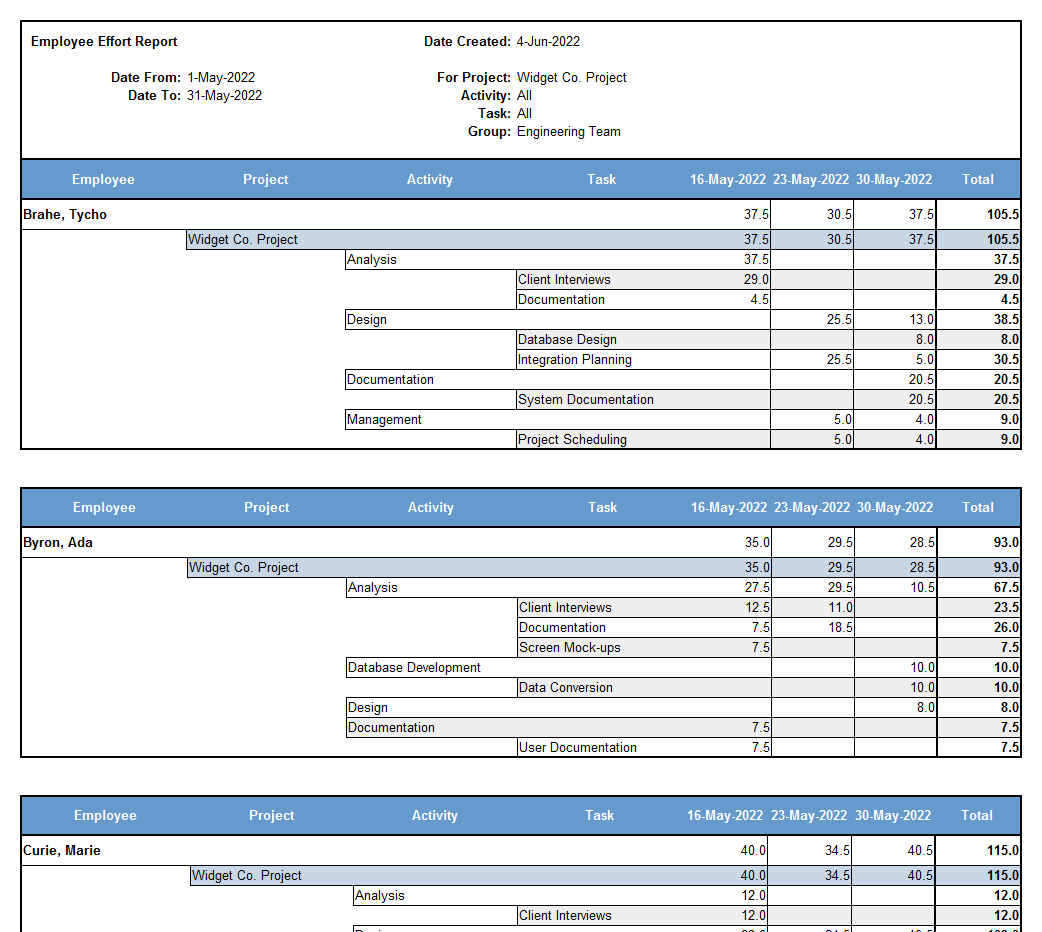
As described in the System Documentation and summarized in screen shots, a variety of reports can be created to display the effort which a single employee, project team or all staff have recorded for a given day, week, period of weeks or for all time. This can be used to track project progress or to show you at-a-glance how much employee or team effort is being directed to a single project, task or non-billable piece of work.

You can also create Work In Progress reports of completed projects or employee and project effort and billing summaries to itemize where hours have been directed and how they relate to invoiced revenue. This provides you with a detailed breakdown of all effort expended on your company's delivered work and lets you improve the accuracy of your revenue and time estimates by using your own staff's real-world experience as a baseline for reference.


How do I use the application to [perform some system function]?

Each Users Guide included with the application download (and also found in the System Documentation section of our web site) includes a section titled "How Do I..?".

In these sections you can find step-by-step instructions which walk you through tasks commonly performed with Senomix Timesheets.


Our office requires hard-copy signed timesheets.
Are these available?


A print-ready timesheet can be created by any user application. Once a timesheet has been entered, it can be printed for signing by an end-user or administrator at any time.


Will Senomix Timesheets work with my company's Reporting or Payroll Software?

Senomix Timesheets is ready to use with the QuickBooks, MYOB and Peachtree accounting packages. The data export function of Senomix Timesheets can also be tailored to transfer your timesheet data into any other database. This can be accomplished using your payroll or reporting system's integrated data load utility, or through the use of a third-party tool such as Oracle's SQL*Loader or PeopleSoft's Import Manager.

Once imported into your database, Senomix Timesheets data can be used by any reporting or analysis tool preferred by your office (such as PeopleSoft, Crystal Reports or Business Objects), or you can use the application's built-in reporting functionality to display your timesheet, project progress, billing invoice and expense claim summary data as print-ready HTML pages or editable Microsoft Excel spreadsheets.


Will Senomix Timesheets work with my company's application networking environment (e.g. Citrix)?

Yes, the time entry, administration and reports applications for Senomix Timesheets can all be deployed via application networking systems such as Citrix.


Can Timesheets be transferred to QuickBooks?

Yes, timesheet data can be directly exported into the Weekly Timesheets of your office's QuickBooks accounting software.

Instructions for the creation of a QuickBooks Data Export can be found in the Administration Application Users Guide with an overview of the QuickBooks Time Tracking process available here.


Can Timesheets be transferred to MYOB Accounting?

Yes, just like QuickBooks, timesheet data can be directly exported into the Activity Slips of your office's MYOB Accounting Software.

Instructions for the creation of a MYOB Activity Slip Export can be found in the Administration Application Users Guide.


Can Timesheets be transferred to Peachtree?

Yes, just like QuickBooks and MYOB, timesheet data can be directly exported into the Weekly Time Tickets of your office's Peachtree accounting software.

Instructions for the creation of a Peachtree Data Export can be found in the Administration Application Users Guide.


Can Timesheets be transferred to "Product X"?

If your accounting software can import timesheet data, Senomix Timesheets can be adjusted to provide an export file for it.

For further details about how Senomix Timesheets can be adjusted to fit your software, please contact us.


Can I try the application before I buy it?

Certainly!

A free evaluation version of the system is available for download from our web site. This evaluation version includes all features of the Timesheets Server (registered for 2 users for a maximum of 10 timesheets) and the Timesheet Entry, Administration and Reports applications.

If you decide to purchase the application, Senomix also provides you with a no hassle, no questions asked, full money-back guarantee for 90 days from the date on which you purchased your license. It's our promise you'll be delighted with our software.


Is there someone I can contact for more information?

If you didn't find the information you were looking for or would like more details about Senomix Timesheets, please contact us direct so that we might answer your questions.


There is a feature I would like to have. Can you add it?

We are always looking for ways to improve our software and would be pleased to consider any new system functionality which you might require.

If there is a system feature you would like to see included in a future version of Senomix Timesheets, please send your request in an e-mail to us and we will do our best to incorporate that functionality into a future version of the system.


Licensing


How are licenses structured for the application?

The license sold for each Senomix Timesheets system covers the use of one server on one computer and identifies the maximum number of users which may be listed on that server. For example, if you purchased a 50-user license, up to 50 distinct people would be able to submit timesheets to that one system.

The client applications used to enter timesheets or administer the system may be installed on any computer used by your staff. This means that any person registered on the server can use the system applications from their desktop computer, their laptop computer or any client-site or home computer from which they would like to do their work.

There is no limit to the number of computers on which the client applications may be installed; However, they must be installed for use by staff members registered on your Senomix Timesheets server.


Is Senomix Timesheets subscription-based?

Senomix Timesheets is installed and run on your own network and does not require any access fees or network connection to Senomix for operation.


Are there any monthly access fees?

There are no recurring access fees for Senomix Timesheets. The license purchase price is a one-time charge.


Do I need to purchase the Windows, Mac and Linux versions separately?

Each Senomix Timesheets license purchase includes all application files for Windows, Mac OS X and Linux, so no additional purchase is necessary.


Can I upgrade my license to increase the number of available users?

Yes, a Senomix Timesheets license can be upgraded at any time and just takes a few minutes to apply to your existing installation. You can contact us to find out how.


What about when an employee leaves? Do I need to buy another license to keep their recorded time?

If a user registered in Senomix Timesheets leaves your organization, you can set that user record to be "Historic".

"Historic" records are permanently disabled accounts and are not counted against the maximum number of users in an office's license. Setting a user record to Historic freezes the account to preserve all timesheet and expense claim information and lets you add a new user in its place without requiring an additional license purchase.


What product support is provided?

You should find everything you need to get up and running by visiting our documentation page but, if you require additional help, 90-day 'getting started' support is provided at no charge and is available via phone or e-mail during Senomix's office hours, as described on our contact page.

As we strive to make Senomix Timesheets the best possible fit for your office, requests for new application functionality are always welcome.


Can I use a Senomix Timesheets license in more than one office?

If all system users will be connecting to the same Senomix Timesheets Server, your system license will also cover all employees in branch offices. However, if you would like to run the Senomix Timesheets Server in more than one office, you must purchase an additional license for each office which uses the server program.

The license purchase price for Senomix Timesheets only covers the use of one installed server, but you may install as many client applications (for entering timesheets and administering the system) as you need.


Do you provide discounts to Non-Profit or Educational organizations?

Yes we do! If your office is a not-for-profit charitable corporation or accredited educational institution, we will provide you with a 15% discount off our listed product price.

Just send an e-mail to sales@senomix.com describing the national non-profit or educational status of your company and identifying the license package you wish to purchase, and we will e-mail you an appropriate purchase link to our secure Internet store.


How do I purchase upgrades to new versions of Senomix Timesheets?

An annual Upgrade Subscription provides your office with all upgrades to Senomix Timesheets as they are released.


Can I buy an Upgrade Subscription after I've purchased a license?

Yes! An Upgrade Subscription can be purchased at any time, so you can decide not to buy an Upgrade Subscription with your license and wait until you see a product release you would like to purchase an upgrade for.


So, I don't need to purchase an Upgrade Subscription at the same time I buy a license?

Nope! If you'd like, you can wait until an upgraded version of Senomix Timesheets provides the new features you wish to upgrade for.


If I don't have an Upgrade Subscription and want to upgrade to a new version of Senomix Timesheets, how do I purchase that upgrade?

Contact Senomix to purchase the Upgrade Subscription required to bring your office up-to-date from the time of your original purchase (or date of expiry of your previous upgrade subscription).

For example, if you purchased a 15-user Senomix Timesheets license on March 1st, 2009 and saw a version you wanted to upgrade to on December 12th 2010, you would purchase two years of Upgrade Subscription (at $20 per user for 15 users for two years, totaling $600). This would make your Upgrade Subscription active until March 1st, 2011 and provide your office with the upgraded version of Senomix Timesheets you wanted.


What happens if a new version of Senomix Timesheets is released soon after I buy a license?

Regardless of whether or not you purchase an Upgrade Subscription for your office, an upgrade to the next version of Senomix Timesheets will always be provided to you at no charge if it is released within 90 days of your original license purchase date.


How often is Senomix Timesheets updated?

Senomix Timesheets is typically updated with a new version on a bi-annual (6-month) schedule, although some smaller upgrades may be released on a quarterly basis.


Installation and Operation


Will our office data be stored on someone else's computer?

All data recorded in Senomix Timesheets remains on your own office's network. The Timesheets Server program stores its data on the computer you have chosen to act as your office's server.


How do I install Senomix Timesheets in my office?

Instructions for installation can be found right here.

You can also find step-by-step instructions for installation in the Installation Guide or you may contact us if you have questions with what you have read.


How about installing the Client applications?

For the client applications used by your staff to enter timesheets, your office has two choices:

You can install the system through your network as a web-enabled Java Web Start program, which is launched from a single point on your corporate Intranet. A Java Web Start deployment allows you to install and manage all client applications from a single network computer and is the most effective choice for larger installations.

OR

You can install the client applications as regular programs. This involves installing the system on each of your users' computers (just like you would do with a word processor or spreadsheet application) and may be accomplished in just a few minutes for each computer.

Each of these installation options are outlined in the Installation Guide.


Can I install the system on a Macintosh OS X computer?

Yes, a version of Senomix Timesheets made specifically for Macintosh OS X is available. Each of the Timesheets Server, Time Entry, Administration and Reports applications can be run from your Mac as you would like.

Details about a Macintosh OS X installation can be found on our documentation page.


Can I enter time from Linux?

Yes, the Timesheet Entry application can be launched via Java Web Start for use on Linux or Macintosh OS X computers.

Details about using Senomix Timesheets on those operating systems can be found on our documentation page.


Do I need to install the 'server' application on my company's server?

You can if you'd like. The Senomix Timesheets server can also be operated on any Windows or Mac OS X PC with access to your user's network if you would prefer to not run it on your network server.


Can the Timesheets Server be run as a Windows Service?

Yes, the Senomix Timesheets server program can be run as a Windows Service on your computer.

Instructions for installing the Windows Service version of the Timesheets Server can be found in the Installation Guide.


Can the Timesheets Server be run as a Mac OS X Daemon Process?

Yes, the Senomix Timesheets server program can be run as a Mac OS X Daemon.

Instructions for installing the server as a Daemon process can be found in the Mac OS X Installation Guide.


How do I find the IP Address of the Timesheets Server?

Since every office's network can be different, the best person to ask for that information is your network system administrator.

According to what our web site can see, the computer you're working from right now has the IP Address "38.107.191.119", but that might not be the IP address your network uses to handle office traffic (particularly if you're using a router or other traffic-managing hardware).

If your system administrator is busy system administrating, you can find your computer's IP address yourself:

For Windows:

Open up an MS*DOS command prompt window (under the Windows Start Menu icon "Programs -> Accessories -> Command Prompt"), enter "ipconfig" and then hit the enter key.

For Mac OS X:

Open the System Preferences folder of your Mac and click the "Network" icon.

In the information displayed, you should see an item labeled "IP Address" with a set of numbers formatted as "xxx.xxx.xxx.xxx" (for example, "192.168.1.5"). That number is the IP Address of the computer you ran the command from.

So, if you enter that command from the computer on which you're running the Senomix Timesheet server, you'll see the IP Address you need to give your system users to log in. Since the Senomix Login Screen remembers the server's IP Address after a user has connected for the first time, you should only need to give that address to your users once.


Can I connect to Timesheets through a VPN or other remote network connection?

Yes, Senomix Timesheets can be used through a firewall or office Virtual Private Network. The network ports you need to clear or forward through your router are listed in the Installation Guide.


Do I need to configure my firewall?

Only if your firewall / router is configured to filter internal network traffic or if you will have users connect to the system from an off-site location (such as a client site, home office or laptop computer 'on the road').

A list of the firewall network ports required for Senomix Timesheets can be found in the Installation Guide.

If you're using Windows XP or Vista and have the operating system's default firewall turned on, Senomix Timesheets may be blocked from communicating outside your computer. If you have difficulty connecting to the Timesheets server from another PC, check the firewall settings noted in the Installation Guide to see if your computer might be set to block all non-Microsoft networked applications.


Do I need a web server to use Senomix Timesheets?

No, a web server is not required to use Senomix Timesheets.


Which operating systems are supported?

Senomix Timesheets can be run on any computer using Microsoft Windows XP or later, with timesheet entry also available on computers running Mac OS X and Linux.


What computer hardware do I need to use Timesheets?

Senomix Timesheets will work with any PC capable of running Windows XP (or later) or Macintosh OS X.


Do I need a database?

Senomix Timesheets includes its own encrypted data manager for collection and storage of timesheet, expense claim and billing code information, so no other databases are required for regular operation.


Why is the evaluation application download so large
(at ~60 mb)?


The evaluation package available for download includes all system documentation, system servers, client administration and timesheet entry applications for the system.

The downloaded package also includes the application's ready-to-run data management system and all runtime environment components required for the operation of Senomix Timesheets. All you need to do is install the application and you're ready to go.


Do purchased versions of Senomix Timesheets have the 'Welcome' screen which appears in the evaluation version?

The 'Welcome' screen is only present in the evaluation version of Senomix Timesheets to provide a guide for new users and does not appear in any of the purchased versions of the system.


How do I move the Senomix Timesheets Server to a different computer?

Instructions for moving the Timesheets Server to another computer can be found in the Documentation Section of our web site.


Will all users require the full installation package?

Purchased versions of Senomix Timesheets may be deployed to your staff with just the Timesheet Entry, Administration or Reports applications as suits your needs.


Can I give a manager report generation access?

Yes! The "Reports Only" tool allows your managerial users to generate system reports without requiring the granting of full administrative privileges.


Will we need to hire a contractor or corporate trainer for the system?

Senomix Timesheets is ready-to-use right out of the box, with no on-site contractors or trainers required. Once you've run the installer, your system server will be ready to accept your company's billing code and timesheet data immediately.

The System Documentation section of our web site provides all information you should require to get yourself up and running in just a few minutes, with our support team ready to answer any questions you might have at support@senomix.com.


FAQ for Bloggers and Reviewers


If you would like to write a blog entry or review about Senomix Timesheets, you may find these answers and associated resource links helpful.

If you have any other questions along the way, just
contact us.


Could you give me a brief description of your software?

Senomix Timesheets is a networked time tracking system designed for use by small and mid-sized businesses. Time can be entered from Windows, Mac OS X, BlackBerry and Linux and is stored in a central database located on a single Windows or Mac OS X computer.

Time entry and system administration can be performed in an office network or over the internet as suits a business's work habits. So employees can be located in the same building, operate from different offices, tele-work from home offices or be located at various sites around the world.


How is Senomix Timesheets different from other time tracking systems?

Senomix Timesheets is networked to run over the internet but is not a 'web app'. The system uses fast-responding stand-alone executable applications (rather than web browsers) with all components run on an office's own computer equipment.

Rather than providing a Software as a Service (SaaS) solution paid for through recurring monthly charges, all Senomix Timesheets data is stored on a customer's own office network and the license purchase price is a one-time charge.

No dedicated web server or database hardware is required for Senomix Timesheets and the server program itself can be installed within a few minutes.


Can I run Senomix Timesheets on my own computer to review it?

Yes you can! The evaluation version of the system can be installed on any current Windows or Mac OS X computer and is available for download from this page:

Senomix Timesheets Download

Options for Windows, Mac OS X and BlackBerry are available from the respective buttons.

Included in each download bundle is all system documentation you may require to install and use the application. Both the Windows and Mac OS X downloads also include "Getting Started" guides which will introduce you to the basics of entering timesheets and administering the system.

All system documentation is also available for reading on the documentation page of our web site:

Senomix Timesheets Documentation

If you would find it helpful to have a full license of the application for your review, just contact us and we will be happy to provide you with a free license for your use.


How long has Senomix Software Inc. been in business?

Senomix Software Inc. was incorporated in January, 2003 (so, nearly 8 years ago), with Senomix Timesheets available since August, 2003.

We're members of both the Better Business Bureau and the Halifax Chamber of Commerce.


Why "Senomix"? What does that mean?

Senomix was originally planned as a technology company focused on space and defence systems (matching the background of the founders), with the name being a play on Selenology (the study of the Moon). As 'Selenomix Software' didn't easily trip off the tongue, that was shortened to Senomix, with that name retained as focus was shifted to the development of robust office software rather than R&D for robotic systems.

A bit of that space heritage remains today with company participation in groups such as the Space Resources Roundtable, but the focus of Senomix Software Inc. is now purely on commercial software development.


What is the funding status of the company?

Senomix Software Inc. is a privately held Canadian corporation and is not seeking external investment. All company growth has been organic, with initial investment bootstrapped from founder savings and funds for expansion raised from software sale profits.


Do you have a logo I can display or print?

Please feel free to use any of these:

Senomix Timesheets Logo 190x50

Senomix Timesheets Logo 100x26

Senomix Timesheets Icon 128x128


How about application screen-shots?

You can find screen shots of the Senomix time entry and administration applications for each of the Windows, Mac OS X, BlackBerry and Linux platforms on this page:

Senomix Timesheets Screen Shots


Who can I contact for more information?

Please feel free to send us an e-mail or call through the addresses and numbers noted on our contact page.


Senomix Timesheets


   Time Tracking        Screen Shots        Downloads        FAQ        Documentation        Pricing        Privacy Policy        Contact        RSS feed for Senomix Time Tracking Click to verify BBB accreditation and to see a BBB report. © 2003-2010 Senomix Software Inc.  
All Rights Reserved